Extracts text from PDFs using Apache PDFBox and analyzes word frequency with customizable filters
| docs/assets/img | ||
| nbproject | ||
| out/wordanalyzer | ||
| src/wordanalyzer | ||
| build.xml | ||
| manifest.mf | ||
| pdfbox-1.8.16.jar | ||
| README.md | ||
| WordAnalyzer.jar | ||

Word Analyzer
Extracts text from PDFs using Apache PDFBox and analyzes word frequency with customizable filters.
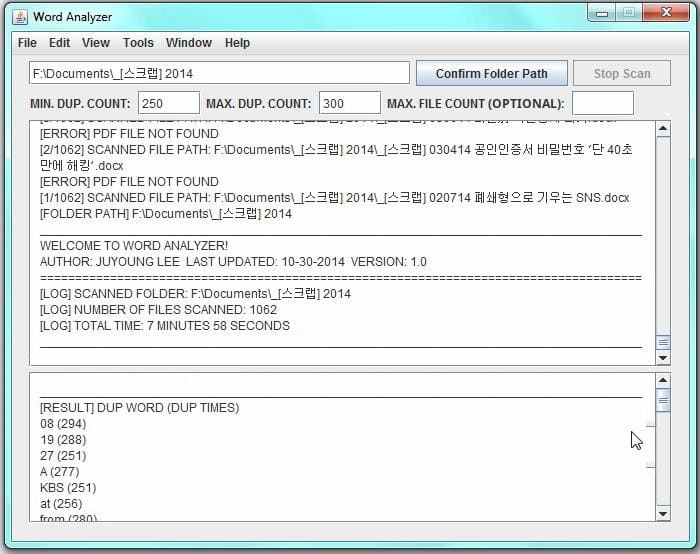
Features
- Scans all PDF files in a given folder
- Counts and displays word frequency
- Filters results by minimum and maximum frequency
- Optional maximum file count limit
- Shows scan logs and results in separate windows
- Displays total scan time
Requirements
- Java JRE 8 or higher
- Apache PDFBox 1.8.16 (bundled, no download needed)
Usage
java -cp WordAnalyzer.jar:pdfbox-1_8_16.jar wordanalyzer.WordAnalyzer
- Enter the folder path containing your PDF files
- Set the minimum/maximum frequency filter
- Optionally set a maximum file count
- Click Confirm Folder Path to start the scan
- Results will appear in the results window when the scan is complete
Building from Source
mkdir out
javac -cp pdfbox-1_8_16.jar -d out src/wordanalyzer/WordAnalyzer.java
jar cfe WordAnalyzer.jar wordanalyzer.WordAnalyzer -C out .