| docs/assets/img | ||
| .gitignore | ||
| .python-version | ||
| README.md | ||
| requirements.txt | ||
| run_mac_linux.sh | ||
| run_windows.bat | ||
| voice_clone_tts.py | ||

Voice Clone TTS
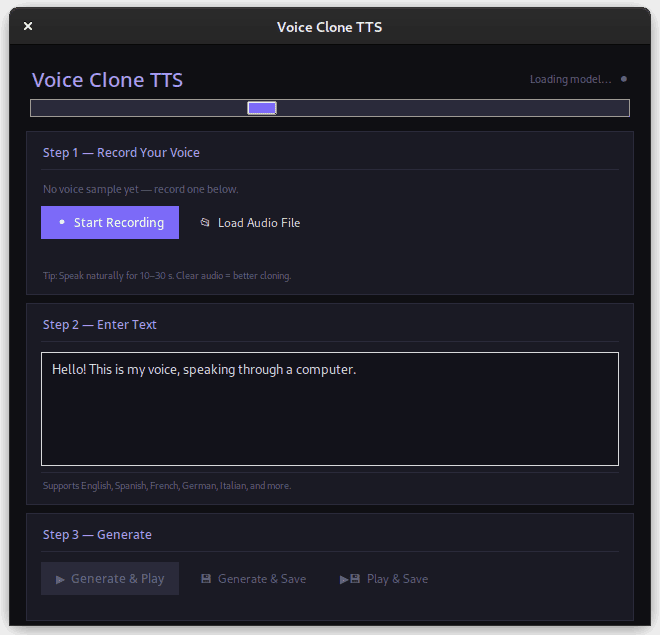
Type any text, hear it in your own voice. Runs fully offline.
Setup (first time only)
1. Install system packages:
sudo apt install portaudio19-dev python3-tk espeak-ng -y
2. Install Python 3.10 via pyenv (required on Debian to avoid lzma bug):
curl https://pyenv.run | bash
echo 'export PYENV_ROOT="$HOME/.pyenv"' >> ~/.bashrc
echo '[[ -d $PYENV_ROOT/bin ]] && export PATH="$PYENV_ROOT/bin:$PATH"' >> ~/.bashrc
echo 'eval "$(pyenv init - bash)"' >> ~/.bashrc
source ~/.bashrc
pyenv install 3.10.14
pyenv local 3.10.14
3. Create a virtual environment:
~/.pyenv/versions/3.10.14/bin/python -m venv .venv
source .venv/bin/activate
4. Install Python packages (takes 15–30 min, downloads ~2GB):
pip install --upgrade pip
pip install --no-cache-dir "numpy==1.22.0"
pip install --no-cache-dir --resume-retries 20 TTS sounddevice scipy
pip install --no-cache-dir "transformers==4.40.0"
pip install --no-cache-dir "torch==2.1.0" "torchaudio==2.1.0"
Running the app
Every time you want to use it:
source .venv/bin/activate
python voice_clone_tts.py
How to use
- Wait for "Model ready" in the top right (first launch only: downloads ~2GB, takes 5–15 min)
- Click Start Recording → read the passage below for 30 seconds → Stop Recording
- Type any text
- Click Generate & Play
Your voice sample saves as my_voice_sample.wav and is reused automatically on future runs.
Best text to record (Rainbow Passage)
"When the sunlight strikes raindrops in the air, they act as a prism and form a rainbow. The rainbow is a division of white light into many beautiful colors. These take the shape of a long round arch, with its path high above, and its two ends apparently beyond the horizon. There is, according to legend, a pot of gold at the end of the rainbow. The shape of a rainbow reminds me of a bridge. Like a bridge, a rainbow is wide in the middle and narrow at its ends."
Read it twice through at your normal pace.
Tips
- Record in a quiet room with no background noise
- Speak naturally — don't put on a "reading voice"
- 30 seconds of clean audio is the sweet spot
- Generation takes 10–30 seconds per sentence on CPU